## Sửa Chữa Nguồn Máy Tính CIRCLE PC ATX CPH698 Thành Công!
Một người bạn kỹ thuật của tôi mang đến cho tôi nguồn máy tính CIRCLE PC ATX SMPS Model CPH698 để sửa chữa với lỗi: nguồn không hoạt động.
Tôi kết nối nguồn với điện và nối tắt chân PS_ON (dây màu xanh lá) với dây nối đất (màu đen) trên đầu nối ATX. Thông thường, quạt nguồn sẽ quay và có điện áp đầu ra trên đầu nối. Tuy nhiên, trong trường hợp này, quạt không quay và không có điện áp đầu ra nào.
Tôi mở nguồn và phát hiện bên trong đầy bụi. Sau khi đeo khẩu trang và làm sạch bụi bên trong, tôi kiểm tra cầu chì và thấy vẫn hoạt động tốt. Việc cầu chì không bị cháy cho thấy có mạch hở ở phía sơ cấp.
Để an toàn hơn, tôi kết nối nguồn với mạch bảo vệ bóng đèn. Tôi thấy không có điện áp trên dây Standby (màu tím) và dây PS_ON (màu xanh lá), vốn phải là +5V nhưng lại là 0V.
Tôi kiểm tra điện áp AC đầu vào điốt cầu và thấy là 270V, dường như ổn. Tuy nhiên, điện áp đầu ra của điốt lại dao động.
Tôi quyết định kiểm tra tất cả các linh kiện phía sơ cấp ở trạng thái nguội. Nếu sự dao động điện áp là do đoản mạch, cầu chì chắc chắn đã bị cháy. Nhưng cầu chì vẫn nguyên vẹn.
Tôi tháo các transistor chuyển mạch sơ cấp MJE13009 để kiểm tra và chúng hoạt động tốt.
IC PWM 7 chân JD3313D được sử dụng trong nguồn này, và nó không có sẵn trên thị trường địa phương. Tôi đã có một số nguồn khác chưa được sửa chữa do không tìm được IC này.
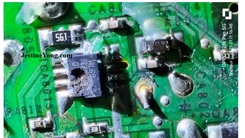
Tôi bắt đầu kiểm tra từng linh kiện xung quanh IC PWM. Khi kiểm tra điện trở, tôi phát hiện ra hai điện trở mắc nối tiếp dùng cho khởi động mềm của IC PWM, cả hai đều là 1.5MΩ. Một điện trở trên mạch in cho thấy giá trị dao động, có thể do ảnh hưởng của trở kháng mạch xung quanh. Vì vậy, tôi tháo từng điện trở ra và kiểm tra.
Một điện trở cho thấy 1.4MΩ, và điện trở thứ hai không có giá trị nào, cho thấy mạch hở. Tôi kiểm tra các điện trở và điốt xung quanh và chúng đều hoạt động tốt. Tôi lấy một điện trở 1.5MΩ từ hộp linh kiện đã qua sử dụng của mình.
Điện trở này cho thấy giá trị 1.47MΩ.
Tôi thay thế điện trở vào vị trí cũ và hàn lại tất cả các linh kiện đã tháo ra. Tôi cấp nguồn cho thiết bị bằng mạch bảo vệ bóng đèn để kiểm tra.
Điện áp trên dây PS_ON hiện nay là 5V. Tôi kích hoạt PS_ON (dây màu xanh lá) bằng cách nối tắt với dây đen. Quạt bắt đầu quay.
Nguồn máy tính đã hoạt động trở lại. Tôi kết nối nó với một thiết lập khác để kiểm tra và nó hoạt động tốt.
Bài viết này được thực hiện bởi Yogesh Panchal, Kỹ sư phần cứng máy tính tại Mumbai, Ấn Độ.
Bạn có biết bất kỳ người bạn nào sẽ được hưởng lợi từ nội dung này không? Nếu có, hãy chia sẻ bài viết này với họ!
#SuaChuaNguonMayTinh #CIRCLEPC #ATXSMPS #CPH698 #SuaChuaThanhCong #LapTop #KinhNghiemSuaChua #BaoDuongMayTinh #ICPWM #DienTu #HardwareRepair #VanDeKyThuat
Hãy viết bài báo dài đầy đủ chuyên nghiệp hay bằng tiếng VIệt kèm hashtag CIRCLE PC ATX SMPS Model CPH698 Repaired

Received Circle PC ATX SMPS for Repair from one of my techie friends, Stating fault symptom: Dead
Connected SMPS to Power & shorted PS_ON pin (Green Wire) to ground (Black) wire on ATX Connector by this shorting SMPS FAN should Spin & there should be output Voltages on the Connector. But here FAN is not spinning and no any output voltages.
So for testing the SMPS I opened it, found SMPS full of Dust. By wearing face Mask I cleaned the SMPS from the inside.
After Cleaning the SMPS I checked Fuse, found OK if fuse is Ok and No power indicates some Open circuit in the Primary side.
So for further testing, for safer side I connected SMPS on Series Bulb Tester Board, I found No Voltage on Standby (Purple) wire & PS_ON (Green) Wire, it should be +5v & it is showing 0v.
Checked AC Voltage input to bridge diode it is showing 270v seems OK but Diode O/P voltage is Fluctuating.
Here I decide to check all primary side Components on cold testing. Because if voltage fluctuation is because of some shorting, fuse have to blow. but here fuse is intact.
So first Removed MJE13009 NPN primary switching Transistors for testing seems Good,
Now Here PWM 7 Pin IC JD3313D is used & it is not available in local market. I already have some SMPS lying with me which have not been repaired due to non-availability of this IC.
Now started checking components one by one around PWM IC. On testing resistor, I found there are two Resistors used in series for soft start for PWM IC both are 1.5MΩ one resistor on PCB is showing some fluctuating Value. May be capturing Circuit impedance of surrounding components. Hence removed resistor one by one and checked.
One resistor is showing 1.4MΩ & second one is showing No reading indicates Open circuit. Checked another surrounding resistors & diodes shows OK. So I took one 1.5MΩ Resistor from my salvaged parts Box.
Checked it is showing 1.47MΩ.
Replaced Resistor on its place & soldered back all removed part & powered the unit for testing using Series Bulb Board.
Checked Voltage on PS_ON wire now it showing 5v.now triggered the PS_ON (Green Wire) by shorting to Ive Black wire. Found FAN is Spinning.
& SMPS is back to the Life. Connected it on another setup for testing it works fine & it is ready to pick up.
This article was prepared for you by Yogesh Panchal who works as a Computer Hardware Engineer in Mumbai India.
P.S- Do you know of any your friends who would benefit from this content that you are reading now? If so, forward this website to your friends or you can invite your friends to subscribe to my newsletter for free in this Link.
Note: You can check his previous repair articles on
Likes (1)Dislikes
 (0)
(0)
//
(tiêu đề viết lên đầu)
CIRCLE PC ATX SMPS Model CPH698 Repaired
Received Circle PC ATX SMPS for Repair from one of my techie friends, Stating fault symptom: Dead
Connected SMPS to Power & shorted PS_ON pin (Green Wire) to ground (Black) wire on ATX Connector by this shorting SMPS FAN should Spin & there should be output Voltages on the Connector. But here FAN is not spinning and no any output voltages.
So for testing the SMPS I opened it, found SMPS full of Dust. By wearing face Mask I cleaned the SMPS from the inside.
After Cleaning the SMPS I checked Fuse, found OK if fuse is Ok and No power indicates some Open circuit in the Primary side.
So for further testing, for safer side I connected SMPS on Series Bulb Tester Board, I found No Voltage on Standby (Purple) wire & PS_ON (Green) Wire, it should be +5v & it is showing 0v.
Checked AC Voltage input to bridge diode it is showing 270v seems OK but Diode O/P voltage is Fluctuating.
Here I decide to check all primary side Components on cold testing. Because if voltage fluctuation is because of some shorting, fuse have to blow. but here fuse is intact.
So first Removed MJE13009 NPN primary switching Transistors for testing seems Good,
Now Here PWM 7 Pin IC JD3313D is used & it is not available in local market. I already have some SMPS lying with me which have not been repaired due to non-availability of this IC.
Now started checking components one by one around PWM IC. On testing resistor, I found there are two Resistors used in series for soft start for PWM IC both are 1.5MΩ one resistor on PCB is showing some fluctuating Value. May be capturing Circuit impedance of surrounding components. Hence removed resistor one by one and checked.
One resistor is showing 1.4MΩ & second one is showing No reading indicates Open circuit. Checked another surrounding resistors & diodes shows OK. So I took one 1.5MΩ Resistor from my salvaged parts Box.
Checked it is showing 1.47MΩ.
Replaced Resistor on its place & soldered back all removed part & powered the unit for testing using Series Bulb Board.
Checked Voltage on PS_ON wire now it showing 5v.now triggered the PS_ON (Green Wire) by shorting to Ive Black wire. Found FAN is Spinning.
& SMPS is back to the Life. Connected it on another setup for testing it works fine & it is ready to pick up.
This article was prepared for you by Yogesh Panchal who works as a Computer Hardware Engineer in Mumbai India.
P.S- Do you know of any your friends who would benefit from this content that you are reading now? If so, forward this website to your friends or you can invite your friends to subscribe to my newsletter for free in this Link.
Note: You can check his previous repair articles on
Likes(1)Dislikes(0)
//
[su_box title=”Liên hệ đặt mua sản phẩm tại bài viết tại Viễn Đông Mobile” style=”default” box_color=”#3be863″ title_color=”#FFFFFF” radius=”3″]
Viễn Đông Mobile là cửa hàng chuyên kinh doanh các sản phẩm điện tử phục vụ nhu cầu chơi game, bao gồm:
- Gaming phone: Điện thoại cấu hình mạnh, tối ưu cho việc chơi game.
- Máy tính bảng chuyên gaming: Màn hình lớn, hiệu năng cao, trải nghiệm game tốt hơn.
- Phụ kiện cao cấp: Tai nghe, bàn phím, chuột,… hỗ trợ game thủ.
Thông tin liên hệ:
- Địa chỉ: 211 đường 3/2, phường 11, quận 10, TP.HCM
- Điện thoại: 0777600020
- Email: contact@viendongmobile.com

Bản đồ chỉ đường
[su_gmap address=”211 đường 3/2 phường 11 quận 10 Tp hồ chí minh Việt Nam” responsive=”yes”] xin chào Xem chi tiết và đăng ký[featured_image]